How I Code with AI on a Budget/Free – September 2025 Edition
A deep-dive into my 2025 AI coding stack using GLM 4.5, Gemini 2.5 Pro, Cline and AI Code Prep.
How I Code with AI on a budget/free
My Browser Setup: The Free AI Buffet
First things first, I have a browser open loaded with tabs pointing to the free tiers of powerful AI models. Why stick to one when you can get multiple perspectives for free? My typical lineup includes:
- At least 2-3 tabs of z.ai's GLM 4.5 – free on web, and seems as good or better than Claude 4! no joke. Get 10% off Z.AI's coding plan if you want API access for Claude Code (works amazingly well, less hallucinations than real Claude Opus!).
- At least one tab but more like three of Google Gemini AI Studio (Gemini 2.5 Pro/Flash are often free and unlimited here).
Also, try Google Gemini 2.5 Pro (different than AI Studio, has better image generation and deep research; I always have a couple tabs of this along with a couple tabs of AI Studio). - Couple tabs of Poe.com usually set to Claude 4 or o4-mini for its free daily credits on premium models.
- Several tabs of OpenRouter, set to several models, some free models, some not.
- At least one tab for ChatGPT (the free version is still useful).
- At least one tab for Perplexity AI, especially good for research-heavy questions.
- At least one tab for Deepseek (v3 and r1 are free on their web interface, though watch the context limit).
- One tab for Grok.com. Good, free and seemingly unlimited for general use and deep research/image editing. I mainly use the deep research feature, similar to perplexity.
- Phind is another free one, it tries to show you flowcharts/diagram visuals.
- lmarena.ai offers free access to Claude Opus 4 and Sonnet 4 and others. Free Opus 4 is so good.
Claude.ai - Free but sometimes so limited it's annoying to use, so I use other sites/ways to access Claude like Cody extension, Copilot, etc.
### ⚠️ Important Disclaimer about Grok Grok offers free compute and uncensored image generation, which can be useful when other models' safety systems interfere with legitimate tasks. However, reports indicate that Grok has been instructed to lie about about some things. While the misinformation appears to be mostly on X, if you keep in mind to restrict usage to coding or be cautious knowing it might be programmed with questionable motives, it can occasionally be useful. It was never that great though but its sometimes okay.
A smarter, cheaper workflow: Focused Context
When you use AI in web chat's (the chat interfaces like AI Studio, ChatGPT, Openrouter, instead of thru an IDE or agent framework) are almost always better at solving problems, and coming up with solutions compared to the agents like Cline, Trae, Copilot.. Not always, but usually.
When you use things like Cursor, Cline, Roo Code for everything, they are sending tons of text to the AI about how to use their tools, how to use or activate MCP server stuff, edit files, etc it "dumbs it down" too much. It gets confused. People end up paying for the most expensive best models to do everything and even that isn't enough to get over the dumbing down effect from the AIs getting tons of unneeded information unrelated to your problem.
So when that happens, I use my tool to generate the right context to solve my problem. Then I paste it into one of the many AI web chat's (sometimes more than one, since they sometimes give different answers) and just ask it questions or ask it to code review, to try to figure out why x is happening when y is happening...etc then when it figures out a solution.. i have it write a prompt for Cline or another agent type thing to do the actual file edits. GPT 4.1 can handle this just fine and I have unlimited. No reason to be wasting Claude credits to edit files. No reason to be sending Claude a bunch of crap it doesn't need making it dumb. I can use Claude to plan out anything or fix really hard problems, cheap, using Openrouter web chat then just paste it back in Cline and let it run.
After doing this for a while, you really get a feel for which models excel at which types of tasks.
**How AI Code Prep Helps (Example Prompt Structure):** _Can you help me figure out why my program does x instead of y?_ Then, [AI Code Prep GUI](https://wuu73.org/aicp) (for Windows, Mac, Linux, and web) steps in. It recursively scans your project folder (subfolders, sub-subfolders, you name it) and grabs the code, formatting it nicely for AI like this: The context block generated by AI Code Prep looks like this:Can you help me figure out why my program does x instead of y?
fileName.js:
<code>
... the contents of the file..
</code>
nextFile.py:
<code>
import example
...etc
</code>
Can you help me figure out why my program does x instead of y?
It writes it twice if you have that option enabled, which helps get the AI to focus better on your question/prompt. You can choose to have it on top, bottom, or both. OpenAI claims this helps, I haven't really tested to see if that's true but it seems logical. On Windows, you just right-click somewhere inside your project folder (or on the folder itself) and select "AI Code Prep GUI" from the context menu (look at the screenshots on the site). A GUI window pops up, usually with the right code files pre-selected. It smartly tries to skip things you likely don't need, like `node_modules`, `.git`, etc. If its guess isn't perfect, you can easily check or uncheck files. This is super useful when your project is huge and blows past an AI's context limit. You can manually curate exactly what the AI needs to see. The problem with many coding agents like [Cline](https://cline.bot/), Github Copilot, Cursor, Windsurf, etc., is that they often send either WAY too much context or WAY too little. This is why they can seem dumb or ineffective sometimes. Sometimes, you just gotta do things yourself, use a tool like mine to select the files yourself, but it helps auto-select the code files while skipping the stuff you probably don't need (but still have the option to add what you want with the checkboxes) and then dump that curated context into several AIs (especially the free web ones!). There are other context-generating tools, but many are command-line only, or need a public GitHub repo link. What if your code is private? What if you want to keep it local? What if you prefer checkboxes on a GUI? For something like this a GUI makes sense. It has some other things I haven't seen anywhere else like the preset buttons, dual placement of problem/prompt, per-project saves. 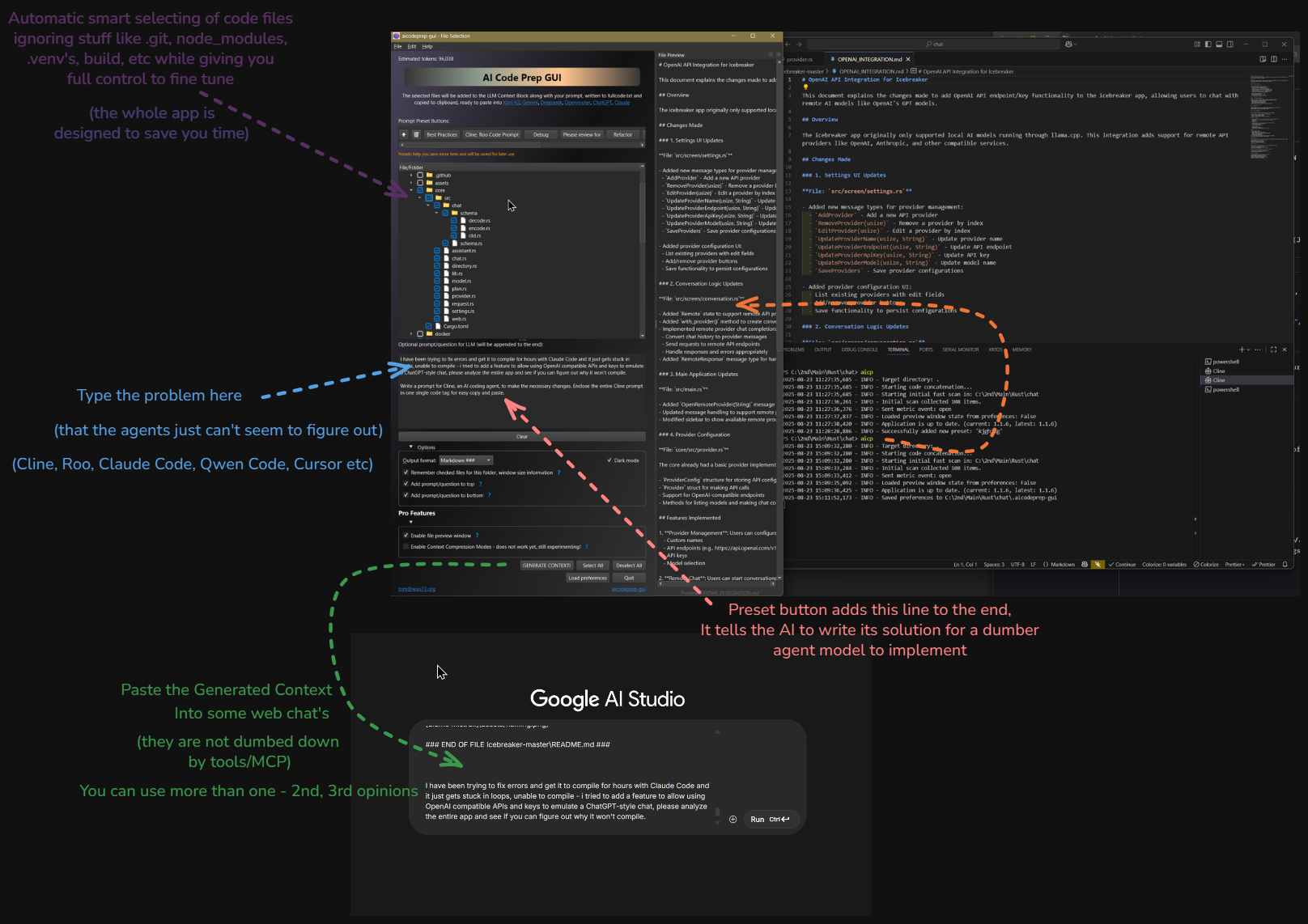
Model Strategy: Picking the Right Brain for the Job
Model Strategy: Picking the Right Brain for the Job
Since many great models are free to use via web interfaces (like Gemini in AI Studio, Grok, Deepseek), I prioritize these. Poe.com also gives free daily credits for top models like Claude and the new o4 series.
Gemini 2.5 Pro (via AI Studio) is great for debugging, great for planning, and also finding it the best at lots of things now. For really thorny issues, I might try the new o4-mini (available via OpenRouter or Poe). It surprisingly fixed a persistent bug for me right away, though I'm still figuring out its best use cases. It's notably cheaper via API than the previous top dogs like Claude 3.5/3.7/4.
I usually try Claude 3.7 or 4 at some point, via Poe or API (OpenRouter makes this easy), or github Copilot chat (you can get some free usage from that if you don't pay) but it's pricier for frequent use. Think of Claude 3.7 and 4 as Claude on Adderall – brilliant, sometimes verbose, maybe a bit 'psychotic' like Hunter S. Thompson. Lots of great output, but you might need a calmer model like Claude 3.5 to refine it or do the actual coding.
For really hard problems, try using OpenAI's o3 or GLM 4.5, Qwen3 Coder 480b. You can get lots of free daily tokens if you set your account to allow sharing of your data to help train models. Go to the Open AI Playground page, click the settings icon in the upper right, then click Data Controls on the left sidebar, then Sharing on the displayed page, there you can change the "Share inputs and outputs with OpenAI" setting to Enabled, which will give you:
- Up to 250 thousand tokens per day across gpt-5, gpt-4.1, gpt-4o, o1 and o3
- Up to 2.5 million tokens per day across gpt-4.1-mini, gpt-4.1-nano, gpt-4o-mini, o1-mini, o3-mini, o4-mini, and codex-mini-latest
This is really awesome, o3 and GPT 4.5 seem super genius! Sometimes in the OpenAI Playground, I have it set up to use o3 and o4-mini side-by-side, to compare them. This helps me get a feel for which ones are best for which types of problems.
Claude 4 and 3.7 is always a good option to try and fix hard problems quickly, it is just harder to access it for cheap or free. But it is often the best out of them all. When you really need to fix something fast, use it. Poe has free tokens for all models, daily. OpenRouter has all models paid and/or free. Claude 3.7 is Claude on caffeine – brilliant, sometimes verbose, maybe a bit 'psychotic' like Hunter S. Thompson. Lots of great output, but you might need a calmer model like Claude 3.5 / 4 to refine it or do the actual coding.
The Hybrid Approach: Premium Planning + Budget Execution
After extensive testing with various models, I've developed a hybrid strategy that maximizes both quality and cost-effectiveness. The key insight is that different models excel at different parts of the development process.
My "smart juice" theory of model intelligence
How Models become stupid under certain circumstances: AI models are usually smarter the less text you send to them. Think of each model as having a fixed amount of "intelligence" or "smart juice" available for every question or problem you ask. When you send a simple, focused prompt, nearly 100% of that intelligence is available to solve your problem. But the more complex your input—long agentic instructions about how to use tools, lots of context unrelated to your specific problem, or multiple pages of code—the more of that "smart juice" gets used up just processing the unrelated stuff like how it can use tools in your IDE, leaving less intelligence energy available for your actual problem.
This is why tools like Cursor, Cline, and other agentic systems can sometimes seem less effective: if they send five giant pages of instructions and context before even getting to your real question, the model's available intelligence for your specific problem drops. The more "stuff" you send, the more diluted the model's focus becomes. For best results, keep your prompts as concise and targeted as possible—curate the context so the model can use its full intelligence on what matters most.
When you have a hard problem or bug, you will usually save time by using AI Code Prep to dump it into a web chat (as discussed on page 1 of this guide). It cuts out all the extra instructions and stuff that get sent in agentic IDEs/apps. I noticed that this works better even if you give the AI ALL of the files from your project. The agentic instructions/stuff/bloat that is unrelated to your actual problem is the content that seems to make the AI dumber/run out of juice.
My Workflow is something like this when starting a new project:
- Plan & Brainstorm: Use the smarter/free web models (Gemini 2.5, o4-mini, Claude 3.7, 4, o3, etc) to figure out the approach, plan the steps, identify libraries, etc.
- Generate Agent Prompt: Ask one of these smart models: "Write a detailed-enough prompt for Cline, my AI coding agent, to complete the following tasks: [describe tasks]". Sometimes, I'll copy this generated prompt and paste it into another free AI good at rewriting (like ChatGPT) to refine it further.
- Execute with Cline: Paste the step-by-step task list into Cline, configured to use a stable and efficient model like GPT 4.1 or Claude 3.5 (or Claude 4 if it is doing really complicated things). The 4.1's have been trained to follow instructions well.
- Fallback: If GPT 4.1 struggles, switch Cline to use Claude 3.5 via API. It seems to be the next best for reliable execution. Deepseek v3 or R1 is really great at following instructions as well.
Essentially: Use expensive/smart models (and the excellent free Gemini 2.5 Pro) to strategize and plan. Validate the plan by pasting it into 2-3 other free models (Deepseek R1, Claude on Poe if context allows) and ask "Is this good? Can you improve it or find flaws?". Then, use a stable workhorse like GPT 4.1 or Claude 3.5 within Cline to do the heavy lifting (coding).
o4-mini seems particularly adept at untangling complex code logic or figuring out high-level implementation strategies (like choosing frameworks or libraries). I'll often throw my initial idea at Gemini 2.5, o4-mini, GPT 4.1, ChatGPT, maybe o3-mini (try duck.ai - often free), and Phind to get a range of ideas. If the free/cheap options don't crack it, I'll escalate to pricier models via API.
Alternative Agents & Setups
Trae.ai (from Bytedance, makers of TikTok) is a free VS Code compatible IDE with free AI usage, including Claude 4, Claude 3.7, Claude 3.5, and GPT 4.1. Their agents aren't as good as Cline (nothing is as good, to be honest!) but it's free and gives access to the best models. Sometimes, I find its built-in agent isn't as robust as Cline. However, since Trae seems to be a VS Code clone, you can likely install the Cline extension within it! However... it is too overloaded to get any free usage from it, its too slow. I'll still mention it though.. but meh.
So, you could have two setups:
- VS Code + Cline extension + Copilot extension (get the $10/mo subscription for cheap API access via Cline, though the free tier might offer some basic use).
- Trae.ai + Cline extension (potentially leveraging Trae's free model access if Cline can use it, or using your own API keys).
Try both! Sometimes the native Copilot agent solves things Cline struggles with, and vice-versa. I suspect Cline sometimes sends overly large prompts which might hinder performance on certain tasks compared to the more integrated Copilot agent.
Roo Code: Cline's Clone
Roo Code is a clone of Cline, very similar but with some different features that are worth trying out. Sometimes Cline might work better for your workflow, and sometimes Roo Code will. It's a good idea to try both and see which fits your needs for a given project or coding style.
Cline for VS Code is free, but remember you pay for the API calls unless you're leveraging the Copilot subscription trick. Using the VS Code LM API setting in Cline with a $10/month Copilot sub is currently the most cost-effective way to get near-unlimited access to powerful models within the agent.
New CLI Tools: Claude Code, Qwen Code, Gemini CLI
There's a lot of buzz about new CLI tools for coding, especially Claude Code, Qwen Code, and Gemini CLI. People rave about Claude Code's capabilities, though I haven't tried it myself yet. When I do, I plan to set it up to use GLM 4.5 instead (there's a guide for this on the z.ai website).
Claude Code supports subagents—these are agents that only do one task and don't use extra tools. This setup can mimic the streamlined workflow described in this guide, focusing the model's intelligence on a single job. Subagents are a clever way to avoid the "bloat" of agentic instructions and keep things efficient.
If you want to experiment, check out the guides and community tips for configuring these tools. The ecosystem is evolving quickly, and each tool has its own strengths for different workflows.
TL;DR & Model Updates – September 2025
TL;DR: Quickstart Guide
- Models & Roles:
- Planning & Brainstorming: GLM 4.5, Kimi K2, the newest Qwen3 Coder and 2507's, Gemini 2.5 Pro (AI Studio), o4-mini (OpenRouter), Claude 3.7 or 4 (Poe), if you have OpenAI Playground configured for the 250k free daily tokens, I recommend using those up with o3 and GPT 5.
- Problem Solving & Debugging: GPT-5 (free tokens in Playground), GLM-4.5 (it seems to be a genius, about Claude 4 level) Claude 4 (free daily on Poe)
- Actual Coding: GPT-4.1 via Cline; fallback to Claude 3.5.. or the new ones: Qwen3 Coder, Instruct, 2507, GLM 4.5, Kimi K2.
- Key Tools:
- VS Code
- AI Code Prep GUI – locally scan & curate only the files you need, saves so much time
- Cline (VS Code agent) for step-by-step code execution
- Free web chats for multi-perspective advice: Poe.com, ChatGPT, Grok, Deepseek, Perplexity, OpenAI Playground, AI Studio w/Gemini 2.5 Pro, Openrouter, duck.ai
- Quick Workflow: 1. Run AI Code Prep GUI to bundle your (if already existing) project's relevant files. 2. Paste that context into your favorite web chat models for planning & debugging. 3. Ask one model to "Write me a detailed Cline prompt for these tasks," then refine it (e.g. in ChatGPT). 4. Copy/paste into Cline set to GPT-4.1 to generate or fix code; if it stalls, switch to Claude 3.5.
- Cost-Saving Hacks:
- Enable "share data" in OpenAI Playground for 250k free GPT-4.5, o3, (both genius expensive models) & 2.5 MILLION free tokens/day for o4-mini, o3-mini!!
- $10/mo GitHub Copilot subscription gives you rate-limited access to Claude models via Cline
- Pay-as-you-go on OpenRouter for o4-mini, Claude 3.7, and other new models
## Note about some free CLI agent tools Currently as of end of August 2025, Qwen Code (using the GREAT Qwen3 Coder 480b model!) is totally free, 1000-2000 requests a day (I have not run into limits with heavy use). It is an agentic tool that runs in the terminal, but you can also 'borrow' the API key to use in anything. Kilo Code currently has it set up automatically, just choose the Qwen provider. Gemini CLI is also free with high limits but I have heard about getting limited fast. Claude Code is currently said to be the best CLI tool, but it really eats tokens if you aren't getting them for free. Claude Code Router, a free repo on github, allows you to use whatever API you want for Claude Code. OpenCode.ai is another one, it allows me to use my unlimited GPT 4.1 from the $10/month co-pilot subcription. I still have not found that any of these are as good as doing it my way where I use [AI Code Prep GUI](https://wuu73.org/aicp) to plan with models on their native web chat's, then implement with GPT 4.1. Maybe I should try to create my own agentic tool, that separates things so that difficult problems are sent to the smartest AIs without the tools, MCPs, emulating this way of doing it, then send to smaller model for coding.
Latest Model Updates (Aug 2025)
💰 Budget-Conscious: Getting Max Value
GPT 4.5 (DISCONTINUED)
- This model was discontinued.
o3
- Possibly equal to Claude 4 in abilities, really great at fixing hard problems, genius level. Throw your entire codebase in here with AI Code Prep GUI
- Free Tokens: 250k daily when you enable data sharing in Data Controls/Sharing settings
o4-mini
- Not as smart as o3, but very very good, like o3's younger brother
- Free Tokens: 2.5 million daily when you enable data sharing in Data Controls/Sharing settings
Gemini 2.5 Pro
- Free to use in AI Studio. Also very good at fixing hard problems
- Best For: Complex debugging and architectural planning
Deepseek R1 0528
- Super smart model with enhanced reasoning capabilities
- Availability: Free on Deepseek's web interface
🚀 Premium: Fix Problems NOW
Claude 4 Sonnet
- The mega genius, can fix most problems in one shot if you provide enough context (AICodePrep is what I use). These also seem to be the best writers, best at everything really.. the secret sauce
- Use Case: When you absolutely need it fixed right the first time
Claude 4 Opus
- $75 per million tokens, haven't tried it yet myself but I hear its a super mega genius like Sonnet but even better, magic sauce
- Performance: Rumored to be the ultimate problem solver
Solid Worker Models
These models listen to instructions really well and do as they are told:
GPT 4.1
- Use the above smarter models for abstract high level design or to fix problems, then 4.1 to make changes. You can cut and paste output from anywhere else right into Cline with 4.1 to do the coding.
Claude Sonnet 3.5
- Good solid model for coding and editing, slightly slower vs 4.1 but very reliable.
Deepseek v3
- Pretty good and very cheap for a model that can do edits/code/agent work.
OpenRouter Free Models
- Drag the price filter to $0 on OpenRouter to see free models available for testing. Worth experimenting with new ones as they become available.
Free Claude 4: lmarena.ai, and More
Claude Opus 4 and lmarena.ai
- lmarena.ai offers free access to Claude Opus 4 and Sonnet 4 and others.
- Any free usage of anything by Anthropic is worth saving, remembering, and using. When all else fails, or when you need to get stuff done, perfectly, and now, choose Claude 4 Sonnet or Opus.
Latest Model Updates (2025)
Claude Sonnet 4 & Opus 4
- Status: Just released and proving to be the best models for everything
- Performance: Fixed some bugs today that were hard for most other models to handle
- Cost: More expensive, but accessible through GitHub Copilot $10/month (rate limited)
- GitHub Copilot Value: The cheap $10/mo GitHub Copilot subscription seems to be giving me a very generous amount of Claude 4 uses through the VS Code LM API. I keep using it as my main model in Cline/Roo Code, and it has not run out yet. I either use GPT 4.1 or Claude 4, been waiting for it to limit me but it hasn't yet (they say that GPT 4.1 is unlimited). I always hate subscriptions for anything, but this particular one is insanely good value.
- Strategy: Save Claude 4 for tough problems, use GPT 4.1 for regular coding
GPT 4.5
- Performance: Excellent for bug fixing and complex problem solving
- Token Limits: 250k tokens daily if you allow data for model training
- Cost Hack: Free under the 250k token limit when you enable data sharing in settings
- Use Case: Great for using AI Code Prep tool to analyze entire codebases
## NEW!! Bad ass new Chinese models + GPT 5 **GLM 4.5** - Very much like Claude 4 Opus or Sonnet; follows agentic rules and uses tools near perfectly. Fixes really hard bugs and handles complicated tasks with lots of context. **Qwen3 Coder 480B** - Another super great one; a favorite for being powerful and cheap. **Qwen3 Instruct & Thinking 2507** - Similar to Qwen3 Coder—strong, dependable, and cost-effective. **Kimi K2 (Moonshot)** - Feels Anthropic-inspired or trained on Claude-like synthetic data. Really good; used a lot. **GPT-5** - **edit** -- OpenAI has vastly improved GPT-5 since I wrote this and it is actually pretty decent at tools now....but the first week was bad which is when i wrote this: Not very good at custom tool usage (e.g., your own tools/MCP/Cline). Better to plan and fix like this guide suggests using GPT 5 and other insanely great models like GLM 4.5, then have it write a prompt for a simpler agent model to do actual editing and tool usage. GPT 4.1 still wins on value, and the new Chinese models handle custom tools/Cline easily. I have not played around with this one yet to know if its good but usually all models are going to be great at certain things. I am honestly more excited about the Chinese models, because of cost and the experiences so far have proven them to be reliably great pretty much all the time.
Current Coding Workflows that I use (2025)
For New Projects:
- Planning Phase: Type your idea(s) and ask several AI's in web chat's to brainstorm with you and help you figure out a real plan, into notepad or a blank file. - this is just so you can paste into multiple web chat's
- Multi-Model Consultation: Paste into two or three of these models web chat's for different "doctor's opinions": - Gemini 2.5 Pro (free) - GLM 4.5 (free and unlimited!) - Qwen3-Coder or one of the -2507 models - o4-mini on OpenAI Playground to use the free 2.5mil daily tokens - Claude 4 on Poe.com (free daily credits)
- Refinement: Go back and forth to fine-tune details
- Task Generation: Have model write a PRD (Product Requirements Document) markdown file or similar, like "APP_REQUIREMENTS.md" or website requirements etc with a list of all the things it must have. Then have it write step-by-step task list with subtasks, for an AI coding agent to implement. Save this to a new project folder - and you might want to run 'git init' if you use Git.
- Execution: Copy/paste into Cline (or just tell it "your task is in the project requirements .md file") set to GPT 4.1 for 'act' mode (or Qwen 3 Coder, GLM 4.5 Flash.. also free currently and excellent). If you prompt the web models to break a big project into small enough sub-tasks, then you can get away with using a cheaper implementation/agent model. "Cheap" right now for me is GPT 4.1 using the Github Copilot API (I don't even use the actual copilot much I just like the unlimited 4.1 - also every month you get credits to use all the top expensive models like Opus/Sonnet 4 which are great for top level planning, you can also use copilot's own web chat interface)
For Problem Solving, fixing hard bugs:
- Load AI Code Prep GUI tool (type 'aicp' in terminal) and type the problem into the prompt box, look at which files are already selected to make sure that it looks good for context (when in doubt, add more code files, usually it helps)
- Set the options to 'Add prompt to top' and ''..bottom' is usually how i leave that setting.. it seems like it would be wasteful but it seems to help focus the model on the problem better than only having the prompt on top or bottom
- If I am confident that it will be able to fix my problem I will click one of the preset buttons for Cline/Roo Code or one for an agent prompt which just pastes some extra text to the end of the current text in the prompt box, telling the AI to write a solution for an agent to implement the changes (experimenting with this will be the easiest way to understand what it is for - it just saves you from typing that)
- Click the "GENERATE CONTEXT!" button, and if its a hard problem.. i'll paste it into Gemini 2.5 Pro, GLM 4.5, Kimi K2, Qwen3 Coder or 2507 Thinking.. all on their native web chat website (Qwen has an annoying web chat where it pastes it into a file so you have to tell it to read the file)
- Sit back and watch several solutions stream in, bathroom break. Using several AI's from several different companies is a great way to get some diversity in the outputs and it is better than for example.. just using 5 OpenAI models or just using Anthropic's models. It reminds me of how people will have healthier kids if they mate with people from different cultures/different parts of the world. It just produces a faster / better solution. You can even cut and paste the outputs of all of these into Gemini 2.5 Pro (its got such a large context window to handle it) and have AI again compare them all and produce a final "best of all" solution.
- Problem solving like this will often "one shot" a perfect solution, instead of letting agents run around your file system trying to slowly figure out solutions with all the tools and MCPs and other stuff it is often just faster to do it this way!
Task List & Test Driven Development (Coming Soon)
Test Driven Development & Task Lists:
Coming to this guide soon (these other topics)Have the AIs create a detailed task list for Cline, Roo Code, Trae agent, to execute. You can also instruct Cline or Roo Code to use a markdown file to keep track of everything it does, checking things off as it completes them. This will make it easier to track and ensure nothing gets missed.
For now, you can experiment by having a model generate a checklist in markdown, and then ask Cline or Roo Code to update the file as tasks are completed.
Money-Saving Hacks
- GLM 4.5, Kimi K2, o3: 250k tokens free daily by enabling data sharing for model training
- Cheaper Models: 2.5 million tokens on o4-mini (excellent model), 4.1-mini/nano, GPT 5 Mini
- GitHub Copilot: $10/month gives access to new Claude models (rate limited) and GPT 4.1 UNLIMITED for agent work
- Qwen3 has new models Coder and 2507's
- Poe.com: Free daily credits for every type of model
- Web Interfaces: Use free web chat interfaces for planning and consultation
Coming Soon: Live Reddit Data & Insights
Live Reddit Data Scraping & Daily Insights:
A new feature is coming soon: live scraping of Reddit data and daily updated info about how people are using AI models. This will include detailed usage breakdowns, data visualizations, and new insights into real-world coding workflows and trends.
If you buy the Pro version of [aicodeprep-gui](https://tombrothers.gumroad.com/l/zthvs), you will get updated content about more free stuff, free api's, updated model information, any new cost hacks I discover but updated more frequently
AI Coding Tools & Alternatives – September 2025
AI Guide 4: AI Coding Tools & Alternatives
🎯 September 2025 Updates: Free & Cheap Coding Models
GLM 4.5 - The Best Coding Model Right Now
- Price: Only $3-6/month
- Limits: 120 prompts every 5 hours (users report rarely hitting limits)
- Access: z.ai subscription
#### 🔧 Compatible Tools & Integrations GLM 4.5 works seamlessly with these coding assistants using a simple API key: - **Claude Code** - Special Anthropic compatible endpoint available - **Cline** - Direct API integration - **Roo Code** - Full compatibility - **Kilo Code** - API key setup - **OpenCode** - Non-subscription API access (recommended)
✅ Claude Code Works Great with GLM 4.5!
Recommended Setup: Claude Code works excellently with GLM 4.5 from z.ai using their Anthropic-compatible API endpoint. You can use either:
- $3-6/month subscription - Great value with generous limits
- Pay-as-you-go API - Only pay for what you use
Note: I tried using Claude Code Router to allow any OpenAI-compatible API endpoint, but it barely works and I don't recommend it. Just use the official z.ai GLM 4.5 API directly - it's much more reliable!
🔥 Recommended: OpenCode.ai
Why OpenCode.ai is Excellent
- Multiple Models: Works great with GLM-4.5 and many other top models
- Agent Setup: Like Claude Code, you can set up agents that get full fresh context for subtasks
- Superior Performance: Much better output/code than Cline, Roo Code, or Kilo Code
- Fast Iteration: Can quickly iterate and test code changes
- Reliable: Stable and consistent performance
Note: Claude Code is very good with GLM 4.5, but OpenCode offers better stability. OpenCode may have more options than other alternatives.
💰 Chutes.ai - Affordable API Provider
Pricing & Features
- $3/month: 300 requests per day of any model + some free models
- $10/month: 1000-2000 requests per day (resets daily!)
- Top Models Available: GLM 4.5, Qwen3 Coder 480B, Kimi K2 (Sept updated), and more
Note: I typically avoid subscriptions, but this one offers exceptional value for the model access.
**WSL Setup Tip:** Running Claude Code in WSL (Ubuntu inside Windows) tends to be more stable than native Windows versions, while still allowing interaction with Windows files.#### 🚀 Current Top Models Available Most of the best models right now are accessible through Chutes.ai: GLM 4.5, the new Qwen3 Coder 480B, Kimi K2 September update, and many more cutting-edge models at fraction of the cost of direct API access.
💡 Free vs. Really Cheap: The Smart Choice
Yes, You CAN Code 100% for Free, BUT...
It's much better to code for REALLY CHEAP! $10 or less a month is good enough. Just a little bit of money spent in the right places from this guide buys extremely good reliability.
The Reality of "Free" Resources
With the few totally free resources out there, you will often be stuck waiting for API calls. Well... that's not totally right because at the moment you can use Qwen Code with their best coding model pretty much unlimited and it works great (not as good as GLM 4.5 though). I believe Gemini CLI will also let you have generous API calls.
My Current Setup (Total: ~$13/month)
- GitHub Copilot: Unlimited GPT-4.1 + limited GPT-5 & Claude 4
- Chutes.ai: $3/month for access to cutting-edge models
Bottom Line: It's really basically a free-for-all right now - no need to be complaining about Claude's $200/month crap! Smart spending on the right tools gives you professional-grade AI coding assistance for pocket change.